Showing posts with label print. Show all posts

Sunday, January 22, 2012

IDLE Windows and Saves

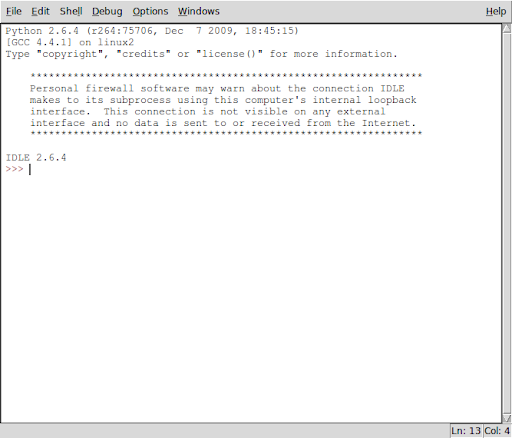
Let's have a look at 'idle', the GUI-fied command line for python...

Idle, the Python GUI

OK, looks pretty standard. It's got "Save" in the menu. Let's give it a try...

Let's see what got saved:
mag@rincewind:~/programming/python$ cat python-shell.txt
Python 2.6.4 (r264:75706, Dec 7 2009, 18:45:15)
[GCC 4.4.1] on linux2
Type "copyright", "credits" or "license()" for more information.

****************************************************************
Personal firewall software may warn about the connection IDLE
makes to its subprocess using this computer's internal loopback
interface. This connection is not visible on any external
interface and no data is sent to or received from the Internet.
****************************************************************

IDLE 2.6.4
>>> print 'I\'m a lumberjack and I\'m OK!"
SyntaxError: EOL while scanning string literal
>>> print 'I\'m a lumberjack and I\'m OK!'
I'm a lumberjack and I'm OK!
>>>


Yuck. Everything got saved. How do we save a program? Lessee...

Aha, a "New Window" item on the menu. Maybe that'll give me an uncluttered window. But what about the prompt? Ah, let's just click it and find out.

Ah, a clear window appears. Let's type something in and save it as 'larch.py'.
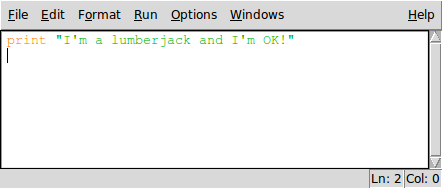
A simple python program entered in a New Window in IDLE.


Let's have a look at the file:
mag@rincewind:~/programming/python$ cat larch.py
print "I'm a lumberjack and I'm OK!"


That's more like it. Let's try running it from the command line...
mag@rincewind:~/programming/python$ python larch.py
I'm a lumberjack and I'm OK!


OK, so idle works as an editor. Now, how about running it in idle? Hmmm...'Open' in the interactive window?

Nope. That just opens the other window.

I can copy and paste, and that works, but it's not very clean. Gotta be a better way.

D'oh! There's a menu item right there that says "Run". Let's see..."Python Shell"?

Nope, that just takes me back to the other window. How about "Run Module F5"?
>>> ================================ RESTART ================================
>>>
I'm a lumberjack and I'm OK!
>>>


Aha! That's the ticket.

Time for a soda.

Saturday, January 21, 2012

Playing with Print

print prints things. Well, duh. Let's see how....

>>>print 'hello'
hello


OK, single quotes work.

>>>print "Hello"
Hello


And double quotes. What about printing quotes? I bet I can nest one type of quote inside the others...

>>>print "Python's Print Puts Pennies in Paragraphs"
Python's Print Puts Pennies in Paragraphs


>>>print 'The Python Quoth "Bring out your dead!"'
The Python Quoth "Bring out your dead!"


What about printing both sorts together?

Hmmm...

Maybe I could concatenate...

>>>print 'The Python Quoth "' + "You're no fun anymore!" + '"'
The Python Quoth "You're no fun anymore!"


That worked. But Python's tricky. Maybe there's an easier way. Multiple quotes?

>>> print ""The Python Quoth "I'm a lumberjack and I'm OK!"""
File "", line 1
print ""The Python Quoth "I'm a lumberjack and I'm OK!"""
^
SyntaxError: invalid syntax


>>> print ''The Python Quoth "I'm a lumberjack and I'm OK!"''
File "", line 1
print ''The Python Quoth "I'm a lumberjack and I'm OK!"''
^
SyntaxError: invalid syntax


>>> print '''The Python Quoth "I'm a lumberjack and I'm OK!"''''
File "", line 1
print '''The Python Quoth "I'm a lumberjack and I'm OK!"''''
^
SyntaxError: EOL while scanning string literal


>>> print """'The Python Quoth "I'm a lumberjack and I'm OK!""""
File "", line 1
print """'The Python Quoth "I'm a lumberjack and I'm OK!""""
^
SyntaxError: EOL while scanning string literal


>>> print """'The Python Quoth "I'm a lumberjack and I'm OK!"""
'The Python Quoth "I'm a lumberjack and I'm OK!


Dang, lost the final double quotes. Lessee...

>>> print """'The Python Quoth "I'm a lumberjack and I'm OK!\""""
'The Python Quoth "I'm a lumberjack and I'm OK!"


Aha! Escaping quotes works!

>>>print 'I\'m a lumberjack and I\'m OK!'
I'm a lumberjack and I'm OK!


Let's try mixing some numbers in.

>>> print 'There are ' + 3 + 'Pythons upon the desk.'
Traceback (most recent call last):
File "", line 1, in
TypeError: cannot concatenate 'str' and 'int' objects


>>> print 'There are ', 3, ' Pythons upon the desk.'
There are 3 Pythons upon the desk.


Commas work, but too many spaces are in there.

>>> print 'There are',3,'Pythons upon the',3,'rd desk.'
There are 3 Pythons upon the 3 rd desk.


OK, the first number is spaced right, how do we get the other one without spaces?

>>> print 'There are',3,'Pythons upon the '+ str(3) +'rd desk.'
There are 3 Pythons upon the 3rd desk.


OK, so we can concatenate with '+', but only if it's a string.

We can use numerals if we put it together with a comma, but then we get an added space.

We can make a numeral into a string with str() and then we can concatenate with + so that we don't get added spaces.

I think I get it.

I'm sure there are a dozen other ways to do this, and at least ten of them may be better. But that'll do for now.