At the Homebrew Computer Club Reunion, I learned that there's the possibility of Jef Raskin's human interface ideas as realized in the Canon Cat will become available to a wider audience through an emulation project at archive.org. I'm not certain, but I believe that it's the TOSEC project.
Further, when looking this up today, I learned that Jef was using Python himself to implement his interface concepts. Unfortunately, raskincenter.org is gone today, the inhabited url by a camper. I'm sure the work is out there somewhere, but presently I'd have more interest in what Aza Raskin is up to, as he seems to be doing a fine job of carrying on.
Showing posts with label Python. Show all posts
Showing posts with label Python. Show all posts
Tuesday, November 12, 2013

Tuesday, January 29, 2013
Python for Android
I installed SL4A (Scripting Layer for Android) and Python for Android on my new Android Phone last night, and I've got to say this makes my phone the neatest portable device I've had since my HP 200LX.
The 200LX was basically an IBM PC-XT that fit in your pocket. It was a clamshell that ran a ROM version of DOS that was even capable of running early versions of Windows if you really, really wanted. My interest was more in running full DOS IDE packages like Turbo Pascal, Modula-2, Turbo C/C++, FORTH, etc. It also had a spreadsheet (Lotus 1-2-3) on ROM, ran dBase and the Clipper compiler well, and a host of other things. I kept one with me for over 10 years, long past its day, because I couldn't find anything comparable that I could carry with me as well and do so much with. There's nothing like being able to whip out a machine with a decent compiler on it while your wife is in the fitting rooms at the mall.
Well now I've got Python on my Android phone. This was my second try.
A False Start
Initially, I did a search on the Play Store. There I found something called QTPython+ that was a free download with at least a couple of positive reviews. Well, I couldn't figure out what it was up to. Its programs don't use normal Python I/O, and so far as I could tell (following the in-app link to the dev website), it's not that well documented. I'm clearly missing something, but it didn't work out for me.
Then, while paging idly through a copy of Android Development with Eclipse, I saw a mention in a later chapter about Python and other scripting languages. I got my phone and went out to the SL4A site right away, book in one hand, Android phone in the other.
The SL4A Install
For those that haven't been through it yet, it's not difficult to do the install, but it's not what you'll be used to from Google Play, or the Amazon App Store, either. At the SL4A site, you'll download and install the latest version of SL4A, which more or less is the support layer for the scripting language. I downloaded sl4a_r6.apk, which would be the R6 version of it. By itself, it doesn't get you much. I think you can get a command line with it.
The next step is to get the Python installer from the Python for Android site. I pulled one marked for R6, Python_for_Android_R6.apk. This is Python 2.6.2, there's another package for Python 3.
Either way, when you install that and start it up you'll get a menu asking whether you want to "Install". This seems confusing (at least it did to me late last night) as you'll ask yourself "Isn't that what I just did?" Actually, you've installed the installer. Click install and wait a few moments while it goes out and gets the other packages you need for a working Python install.
After that, you'll start the app from the SL4A icon. There you'll see a list of the example Python modules the bundle comes with. There are some good examples of starter Android apps there. But you don't have to do things the "Android Way" if you don't wish...
Command Line Junkie
You can also edit your own command-line/text-console Python programs. My first go was an off-the-top-of-my-head version of Guess.py from Invent Your Own Computer Games with Python (the textbook I'm using to start students off with Python in class this year.)
It had to be modded a bit for Python 2, of course, but it worked like a charm.
What fun!
The Source Code (as if you care) ;)
The 200LX was basically an IBM PC-XT that fit in your pocket. It was a clamshell that ran a ROM version of DOS that was even capable of running early versions of Windows if you really, really wanted. My interest was more in running full DOS IDE packages like Turbo Pascal, Modula-2, Turbo C/C++, FORTH, etc. It also had a spreadsheet (Lotus 1-2-3) on ROM, ran dBase and the Clipper compiler well, and a host of other things. I kept one with me for over 10 years, long past its day, because I couldn't find anything comparable that I could carry with me as well and do so much with. There's nothing like being able to whip out a machine with a decent compiler on it while your wife is in the fitting rooms at the mall.
Well now I've got Python on my Android phone. This was my second try.
A False Start
Initially, I did a search on the Play Store. There I found something called QTPython+ that was a free download with at least a couple of positive reviews. Well, I couldn't figure out what it was up to. Its programs don't use normal Python I/O, and so far as I could tell (following the in-app link to the dev website), it's not that well documented. I'm clearly missing something, but it didn't work out for me.
Then, while paging idly through a copy of Android Development with Eclipse, I saw a mention in a later chapter about Python and other scripting languages. I got my phone and went out to the SL4A site right away, book in one hand, Android phone in the other.
The SL4A Install
For those that haven't been through it yet, it's not difficult to do the install, but it's not what you'll be used to from Google Play, or the Amazon App Store, either. At the SL4A site, you'll download and install the latest version of SL4A, which more or less is the support layer for the scripting language. I downloaded sl4a_r6.apk, which would be the R6 version of it. By itself, it doesn't get you much. I think you can get a command line with it.
The next step is to get the Python installer from the Python for Android site. I pulled one marked for R6, Python_for_Android_R6.apk. This is Python 2.6.2, there's another package for Python 3.
Either way, when you install that and start it up you'll get a menu asking whether you want to "Install". This seems confusing (at least it did to me late last night) as you'll ask yourself "Isn't that what I just did?" Actually, you've installed the installer. Click install and wait a few moments while it goes out and gets the other packages you need for a working Python install.
After that, you'll start the app from the SL4A icon. There you'll see a list of the example Python modules the bundle comes with. There are some good examples of starter Android apps there. But you don't have to do things the "Android Way" if you don't wish...
Command Line Junkie
You can also edit your own command-line/text-console Python programs. My first go was an off-the-top-of-my-head version of Guess.py from Invent Your Own Computer Games with Python (the textbook I'm using to start students off with Python in class this year.)
It had to be modded a bit for Python 2, of course, but it worked like a charm.
What fun!
The Source Code (as if you care) ;)
from random import randint
num=randint(1,20)
print 'I am thinking of a number between 1 and 20.'
print 'Try to guess it in 6 guesses or less.'

guesses = 0
guess = 0

while guesses<6:
    print 'Your guess? ',
    guess = int(raw_input())
    guesses = guesses + 1

    if guessnum:
        print 'Too high.'

    if guess==num:
        break

if guess==num:
    print 'You got it in ',
    print guesses,
    print ' guesses!'

if guess!=num:
    print 'Too bad, the number was ',
    print num
Sunday, January 27, 2013
Yet Another Look at Graphics and Sound on Python
Graphics
The more I look at it, the more I think the turtle module may be my answer for the graphics I need in the classroom. To recap, the basic ability I need from graphic in a classroom programming language is basic drawing and sprites. Cell or tile based graphics would be a big plus. In the non-python arena, Greenfoot pretty well has this covered for Java. It includes nice features like collision detection and distance determination as well.
Python's turtles can pretty well be treated as sprites. It's possible to have multiple simultaneous turtles in the current python versions. They can also be given unique appearances. It seems that the ability to use an image is there, but the documentation I've seen makes it look like a reserved feature. I'll have to look more into that.
Repurposing things like this always introduces an extra layer of complexity in the classroom. Students start to feel jerked around if you go and teach them that something is one thing, then start using it to do something else that doesn't follow from the first. In this case, perceiving the turtle as an indicator of where the drawing focus is when using turtle graphics, to forcing it into use as a free-moving entity that has various game behaviors we've associated with it.
It's not insurmountable, in this case, but it is more of a shift in thinking than a dedicated sprite class that aren't turtles by nature (perhaps a parent class of the turtle?)
In this case it's not a big deal, but in the classroom when little shifts like this start piling up one on another it gets harder to for the students to keep things straight and commit them to long term memory.
Another disadvantage of turtle graphics is that I pretty well have to develop my own material for class. I don't have a nice, pre-written book like Invent Your Own Computer Games with Python to draw on. That book is pretty much what let me bring python into my classroom. Using turtle graphics means that I have to write my own lessons using that module.
Sound
I still don't have a good answer for sound. The platform-independent library for sound in python has been taken out of the standard library. Sound is an important part of interacting with the computer for my students. When we've had teams developing video games using Greenfoot and Java in the past, it's not been unusual for the teams to have one of four students spend most of their time creating sounds and music for the games.
Python doesn't even have the ability to go "beep" without a platform-dependent library being added to the core package, as far as I can tell. That's pretty pathetic, what with it being so far to this side of 1983 and all. There are days when I wish the classroom was still filled with 8-bit computers. This is one of the reasons why.
So now, the ability to make sounds is the main thing missing from python so far as my use in class is concerned. I can still use Pygame for that, or have the students call platform-dependent system commands to produce sound.
The more I look at it, the more I think the turtle module may be my answer for the graphics I need in the classroom. To recap, the basic ability I need from graphic in a classroom programming language is basic drawing and sprites. Cell or tile based graphics would be a big plus. In the non-python arena, Greenfoot pretty well has this covered for Java. It includes nice features like collision detection and distance determination as well.
Python's turtles can pretty well be treated as sprites. It's possible to have multiple simultaneous turtles in the current python versions. They can also be given unique appearances. It seems that the ability to use an image is there, but the documentation I've seen makes it look like a reserved feature. I'll have to look more into that.
Repurposing things like this always introduces an extra layer of complexity in the classroom. Students start to feel jerked around if you go and teach them that something is one thing, then start using it to do something else that doesn't follow from the first. In this case, perceiving the turtle as an indicator of where the drawing focus is when using turtle graphics, to forcing it into use as a free-moving entity that has various game behaviors we've associated with it.
It's not insurmountable, in this case, but it is more of a shift in thinking than a dedicated sprite class that aren't turtles by nature (perhaps a parent class of the turtle?)
In this case it's not a big deal, but in the classroom when little shifts like this start piling up one on another it gets harder to for the students to keep things straight and commit them to long term memory.
Another disadvantage of turtle graphics is that I pretty well have to develop my own material for class. I don't have a nice, pre-written book like Invent Your Own Computer Games with Python to draw on. That book is pretty much what let me bring python into my classroom. Using turtle graphics means that I have to write my own lessons using that module.
Sound
I still don't have a good answer for sound. The platform-independent library for sound in python has been taken out of the standard library. Sound is an important part of interacting with the computer for my students. When we've had teams developing video games using Greenfoot and Java in the past, it's not been unusual for the teams to have one of four students spend most of their time creating sounds and music for the games.
Python doesn't even have the ability to go "beep" without a platform-dependent library being added to the core package, as far as I can tell. That's pretty pathetic, what with it being so far to this side of 1983 and all. There are days when I wish the classroom was still filled with 8-bit computers. This is one of the reasons why.
So now, the ability to make sounds is the main thing missing from python so far as my use in class is concerned. I can still use Pygame for that, or have the students call platform-dependent system commands to produce sound.
Wednesday, January 9, 2013
Invent with Python Version Dependencies
I was able to take some time in class today to work on figuring out version dependencies in the programs in Invent Your Own Computer Games in Python. I started with the obvious in the early chapters, changes to print() and input() for Python 2.7.
Then I jumped forward to the chapters that use Pygame. I installed Pygame on the lab computer I was at, which was a Mac running Lion, and was pleased to have it function without having to install all the SDL libraries. Then I tried out the example programs from chapters 17-20 in Invent with Python.
All Clear
It turns out that these all worked fine, without any modification from the code in the book. Since they're mostly a smattering of python holding together a pygame program. ;)
That means I can go around to the lab computers, install Python 2.7 and Pygame, and have that ready for when the students get to the later chapters. I'll take a part of a class period to go over the differences between 3.x and 2.x, then set them loose.
Future Changes
Meanwhile, I'm going through the exercises in the earlier chapters. In the future, I'll start the class with Python 2.7 and have them use the programs with the minimum modifications necessary to work with 2.7. That way the material in the book will still be as close as possible to the example code.
I'll also be providing the students with a page on our class website linking to the specific versions of Python and Pygame we're using in class for the different possible platforms they have at home.
Then I jumped forward to the chapters that use Pygame. I installed Pygame on the lab computer I was at, which was a Mac running Lion, and was pleased to have it function without having to install all the SDL libraries. Then I tried out the example programs from chapters 17-20 in Invent with Python.
All Clear
It turns out that these all worked fine, without any modification from the code in the book. Since they're mostly a smattering of python holding together a pygame program. ;)
That means I can go around to the lab computers, install Python 2.7 and Pygame, and have that ready for when the students get to the later chapters. I'll take a part of a class period to go over the differences between 3.x and 2.x, then set them loose.
Future Changes
Meanwhile, I'm going through the exercises in the earlier chapters. In the future, I'll start the class with Python 2.7 and have them use the programs with the minimum modifications necessary to work with 2.7. That way the material in the book will still be as close as possible to the example code.
I'll also be providing the students with a page on our class website linking to the specific versions of Python and Pygame we're using in class for the different possible platforms they have at home.
Monday, January 7, 2013
Started Python in Class Today
Today my middle school (7-8th grade) classes started Python with the Sweigart book. Everything went well for all students. Had to show one where to find '*' on the keyboard and another how to edit a file, but that's expected.
I have to write up some turtle graphics exercises before they get to the Pygame-based content, now.
I may try using Pygame with Python 2.7 on the Mac. I've been encouraged to do so, so if time permits, I'll try it myself then pick a student or two to be trailblazers for the rest.
I have to write up some turtle graphics exercises before they get to the Pygame-based content, now.
I may try using Pygame with Python 2.7 on the Mac. I've been encouraged to do so, so if time permits, I'll try it myself then pick a student or two to be trailblazers for the rest.
Sunday, September 30, 2012
Python Again This Year
Python went well enough in the classroom last school year that I'll be using it again this year. Last year we had to leave aside graphics programming because of problems with getting a working graphics library on Mac with Python 3 (Pygame, specifically. There are folks working on its problems.) But the students had a lot of fun even with the text programs from Invent Your Own Computer Programs with Python and their own variations on them. So that's enough to make Python worthwhile in class.
We'll be doing the same, and if Pygame works, we'll be adding that as well. Frankly, dealing with version differences between Python 3.x and 2.x in class is something that I don't feel would be productive, so if we don't have a Pygame that works with Python 3 on our Macs in the school's lab, I won't be going to Python 2.x to get it. We'll move on to something else. For middle school, we'll probably continue with more text programs and have fun with formatting and such. For the high school classes, we'll move over to Greenfoot with Java to do a video game project. In the past, my high school students have dealt with the differences between Python to Java without much trouble. The middle school students who have outside experience with programming are similarly capable, but those who haven't or don't do any sort of programming or scripting outside of class struggle with the changes, so it's best just to avoid the change over at that level.
Prior to Python, the students will have had experience with HTML and CSS. Which presents another opportunity for output that's more interesting than simple console text--Python-generated HTML/CSS code. I've found HTML and CSS to be a good introduction to a lot of the concepts of programming, so it's often the first thing we do along those lines.
Finally, I can't say enough about how great a resource Al Sweigart's book is for my classes. It's a great introduction to programming, no matter the language, and Python makes a good starting language in spite of the "formatting as syntax" issues. It makes a great 21st century version of the great beginners' BASIC books of the 70s and 80s.
Here's hoping the Pygame/graphics issues will get resolved. If not, I need to take another look and see if the turtle graphics package is included in Python or will work with minimal effort on my part. If so, then I can prepare some lessons of my own using it to pick up where the text section of the Sweigart book leaves off.
We'll be doing the same, and if Pygame works, we'll be adding that as well. Frankly, dealing with version differences between Python 3.x and 2.x in class is something that I don't feel would be productive, so if we don't have a Pygame that works with Python 3 on our Macs in the school's lab, I won't be going to Python 2.x to get it. We'll move on to something else. For middle school, we'll probably continue with more text programs and have fun with formatting and such. For the high school classes, we'll move over to Greenfoot with Java to do a video game project. In the past, my high school students have dealt with the differences between Python to Java without much trouble. The middle school students who have outside experience with programming are similarly capable, but those who haven't or don't do any sort of programming or scripting outside of class struggle with the changes, so it's best just to avoid the change over at that level.
Prior to Python, the students will have had experience with HTML and CSS. Which presents another opportunity for output that's more interesting than simple console text--Python-generated HTML/CSS code. I've found HTML and CSS to be a good introduction to a lot of the concepts of programming, so it's often the first thing we do along those lines.
Finally, I can't say enough about how great a resource Al Sweigart's book is for my classes. It's a great introduction to programming, no matter the language, and Python makes a good starting language in spite of the "formatting as syntax" issues. It makes a great 21st century version of the great beginners' BASIC books of the 70s and 80s.
Here's hoping the Pygame/graphics issues will get resolved. If not, I need to take another look and see if the turtle graphics package is included in Python or will work with minimal effort on my part. If so, then I can prepare some lessons of my own using it to pick up where the text section of the Sweigart book leaves off.
Wednesday, February 8, 2012
type() and input()
Playing around with type(), a handy function that shows the type of data stored, and input():

The interpreter teaches the concept that data types will be recognised at input. When using the input() function, however, all data is treated as a string. This is documented, but it's not apparently consistent to new users.
The fix is simple, but this also assumes the input data can be converted.
I'm new to this, there may be some other function that accepts and validates only numeric input data.
The interpreter teaches the concept that data types will be recognised at input. When using the input() function, however, all data is treated as a string. This is documented, but it's not apparently consistent to new users.
The fix is simple, but this also assumes the input data can be converted.
I'm new to this, there may be some other function that accepts and validates only numeric input data.
Thursday, January 26, 2012
Beginner's Resources
I've turned up some nice beginner's resources on Python:
Dive into Python is an online book teaching Python step by step, the way I like to approach things in my classes.
Python Tutorials for Kids 8+ also looks like it'll be very useful.
Invent You Own Computer Games with Python is a course using games as the draw. I've ordered a hardcopy of the book, and the book is available online for free. This makes it easy to afford using it in my classes (and students can't claim to have forgotten their textbook when it's online!) I'll be trying it out with my middle school classes this semester.
There are many other python resources out there. Add your favorites in the comments, please!
Dive into Python is an online book teaching Python step by step, the way I like to approach things in my classes.
Python Tutorials for Kids 8+ also looks like it'll be very useful.
Invent You Own Computer Games with Python is a course using games as the draw. I've ordered a hardcopy of the book, and the book is available online for free. This makes it easy to afford using it in my classes (and students can't claim to have forgotten their textbook when it's online!) I'll be trying it out with my middle school classes this semester.
There are many other python resources out there. Add your favorites in the comments, please!
Tuesday, January 24, 2012
Python 2, Python 3
Python 3 kinda gets different right away, for the beginner. It's not huge, just different.
The simple, free, and easy print 'Hello there!' becomes print ('Hello There!'). Doesn't look like too big a difference. Unless you're a beginner, where every single bit of unfamiliar punctuation becomes a step into darkness.
I'm planning on using Python in the classes I teach. I've already used it as one of the "broadening" languages I use. These are languages that aren't central to the class, but I give the students a bit of time with them as a way of letting them have a look at other languages, so that the language we are using doesn't become the only one they've ever seen.
So far, the core of my teaching has been around Java. We don't start right off in Java. We do some command line stuff, we get through some of the introductory concepts there and in BASIC. Then we do a lot with HTML and CSS, which is a great lead-in for more formal programming.
Python, Ruby, C, LISP and LOGO all have a place in my classroom. LOGO becomes one of the languages I use a lot with the middle school classes (6th-8th.) All my classes at least get a look at all these languages, to the Hello, World! level and maybe a bit more if time allows.
I'm strongly considering using Python as the main language for either middle school or high school or both next year. This immediately raises the version 2 or version 3 question.
One of my constraints, my time, immediately suggests an answer to this question. Python 2 is already installed on all the systems in the school lab. If I want 3, I need to go through and spend my own time installing it and checking it out on all the systems. Whereas 2 is there (2.7 right now, as I recall.) All I have to do is have the students open a command line and type 'python'.
All my systems at home are also on Python 2, except for my Windows 7 machine. It had no Python on it, I just installed the latest of the Windows easy installer versions on it last night (3.2-something, I believe.) I played with it for a bit, I'd already seen some information on the differences between 2 and 3 and was able to work my way through without any problems on the basis of those fuzzy memories. I'm not exactly a Python power user, so I only have to cover limited ground.
The same goes for my classes. The concepts we learn about controlling the computer and organizing tasks for it are more important that what language we use, or which version of a language we use. So I don't see going with 2 as a problem. I expect to have a Python 3 familiarity exercise, at least, as part of the class once we're well along and comfortable with Python in general. Just as I have familiarity exercises with different languages including those mentioned above and others that change from year to year.
Online interpreters/compilers help us do that without me having to install new software on the school computers. But those aren't adequate for our regular class work, just for "try it and see" type exercises.
So Python 2 it is. For now.
I'm planning to start doing some curriculum development with my middle schoolers in this Spring semester. They're enthusiastic about being guinea pigs for me. That'll make it easier for me to decide before year end how far to go with Python in my classes, and to have a start on the new materials for next year before summer, the time when I do most of my curriculum development.
Spring semester this year will still have me using Java with Greenfoot for my high school students. They're enthusiastic about that, too. It's been very successful for me for the past several years. It takes time and work to change directions in a class like this, the relative merits of the different languages are only one factor in the choice of language. Personally, I like both languages a lot. Each has advantages that I wish both shared.
Ruby is in the mix, too. Either for an expanded role in the class (such as replacing the time we used to spend on Windows command line), or as the main language in one or the other level of class. I try not to confuse things by introducing too many different languages, so I've got to be careful that I structure things so that one thing builds on another, rather than each new thing being something that adds confusion.
The simple, free, and easy print 'Hello there!' becomes print ('Hello There!'). Doesn't look like too big a difference. Unless you're a beginner, where every single bit of unfamiliar punctuation becomes a step into darkness.
I'm planning on using Python in the classes I teach. I've already used it as one of the "broadening" languages I use. These are languages that aren't central to the class, but I give the students a bit of time with them as a way of letting them have a look at other languages, so that the language we are using doesn't become the only one they've ever seen.
So far, the core of my teaching has been around Java. We don't start right off in Java. We do some command line stuff, we get through some of the introductory concepts there and in BASIC. Then we do a lot with HTML and CSS, which is a great lead-in for more formal programming.
Python, Ruby, C, LISP and LOGO all have a place in my classroom. LOGO becomes one of the languages I use a lot with the middle school classes (6th-8th.) All my classes at least get a look at all these languages, to the Hello, World! level and maybe a bit more if time allows.
I'm strongly considering using Python as the main language for either middle school or high school or both next year. This immediately raises the version 2 or version 3 question.
One of my constraints, my time, immediately suggests an answer to this question. Python 2 is already installed on all the systems in the school lab. If I want 3, I need to go through and spend my own time installing it and checking it out on all the systems. Whereas 2 is there (2.7 right now, as I recall.) All I have to do is have the students open a command line and type 'python'.
All my systems at home are also on Python 2, except for my Windows 7 machine. It had no Python on it, I just installed the latest of the Windows easy installer versions on it last night (3.2-something, I believe.) I played with it for a bit, I'd already seen some information on the differences between 2 and 3 and was able to work my way through without any problems on the basis of those fuzzy memories. I'm not exactly a Python power user, so I only have to cover limited ground.
The same goes for my classes. The concepts we learn about controlling the computer and organizing tasks for it are more important that what language we use, or which version of a language we use. So I don't see going with 2 as a problem. I expect to have a Python 3 familiarity exercise, at least, as part of the class once we're well along and comfortable with Python in general. Just as I have familiarity exercises with different languages including those mentioned above and others that change from year to year.
Online interpreters/compilers help us do that without me having to install new software on the school computers. But those aren't adequate for our regular class work, just for "try it and see" type exercises.
So Python 2 it is. For now.
I'm planning to start doing some curriculum development with my middle schoolers in this Spring semester. They're enthusiastic about being guinea pigs for me. That'll make it easier for me to decide before year end how far to go with Python in my classes, and to have a start on the new materials for next year before summer, the time when I do most of my curriculum development.
Spring semester this year will still have me using Java with Greenfoot for my high school students. They're enthusiastic about that, too. It's been very successful for me for the past several years. It takes time and work to change directions in a class like this, the relative merits of the different languages are only one factor in the choice of language. Personally, I like both languages a lot. Each has advantages that I wish both shared.
Ruby is in the mix, too. Either for an expanded role in the class (such as replacing the time we used to spend on Windows command line), or as the main language in one or the other level of class. I try not to confuse things by introducing too many different languages, so I've got to be careful that I structure things so that one thing builds on another, rather than each new thing being something that adds confusion.
Sunday, January 22, 2012
IDLE Windows and Saves
Let's have a look at 'idle', the GUI-fied command line for python...
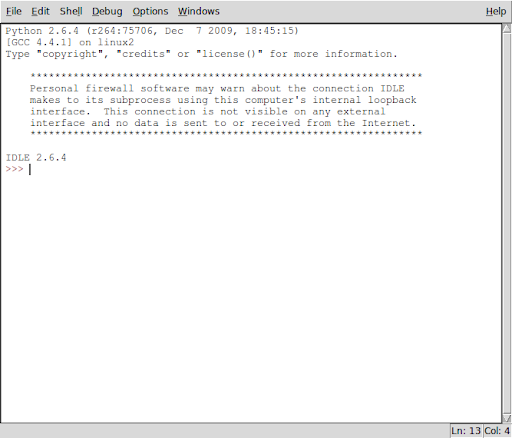
OK, looks pretty standard. It's got "Save" in the menu. Let's give it a try...
Let's see what got saved:
mag@rincewind:~/programming/python$ cat python-shell.txt
Python 2.6.4 (r264:75706, Dec 7 2009, 18:45:15)
[GCC 4.4.1] on linux2
Type "copyright", "credits" or "license()" for more information.
****************************************************************
Personal firewall software may warn about the connection IDLE
makes to its subprocess using this computer's internal loopback
interface. This connection is not visible on any external
interface and no data is sent to or received from the Internet.
****************************************************************
IDLE 2.6.4
>>> print 'I\'m a lumberjack and I\'m OK!"
SyntaxError: EOL while scanning string literal
>>> print 'I\'m a lumberjack and I\'m OK!'
I'm a lumberjack and I'm OK!
>>>
Yuck. Everything got saved. How do we save a program? Lessee...
Aha, a "New Window" item on the menu. Maybe that'll give me an uncluttered window. But what about the prompt? Ah, let's just click it and find out.
Ah, a clear window appears. Let's type something in and save it as 'larch.py'.
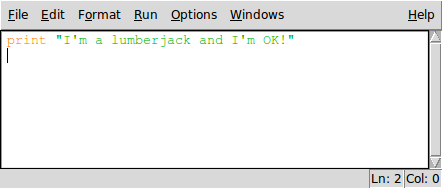
Let's have a look at the file:
mag@rincewind:~/programming/python$ cat larch.py
print "I'm a lumberjack and I'm OK!"
That's more like it. Let's try running it from the command line...
mag@rincewind:~/programming/python$ python larch.py
I'm a lumberjack and I'm OK!
OK, so idle works as an editor. Now, how about running it in idle? Hmmm...'Open' in the interactive window?
Nope. That just opens the other window.
I can copy and paste, and that works, but it's not very clean. Gotta be a better way.
D'oh! There's a menu item right there that says "Run". Let's see..."Python Shell"?
Nope, that just takes me back to the other window. How about "Run Module F5"?
>>> ================================ RESTART ================================
>>>
I'm a lumberjack and I'm OK!
>>>
Aha! That's the ticket.
Time for a soda.
OK, looks pretty standard. It's got "Save" in the menu. Let's give it a try...
Let's see what got saved:
mag@rincewind:~/programming/python$ cat python-shell.txt
Python 2.6.4 (r264:75706, Dec 7 2009, 18:45:15)
[GCC 4.4.1] on linux2
Type "copyright", "credits" or "license()" for more information.
****************************************************************
Personal firewall software may warn about the connection IDLE
makes to its subprocess using this computer's internal loopback
interface. This connection is not visible on any external
interface and no data is sent to or received from the Internet.
****************************************************************
IDLE 2.6.4
>>> print 'I\'m a lumberjack and I\'m OK!"
SyntaxError: EOL while scanning string literal
>>> print 'I\'m a lumberjack and I\'m OK!'
I'm a lumberjack and I'm OK!
>>>
Yuck. Everything got saved. How do we save a program? Lessee...
Aha, a "New Window" item on the menu. Maybe that'll give me an uncluttered window. But what about the prompt? Ah, let's just click it and find out.
Ah, a clear window appears. Let's type something in and save it as 'larch.py'.
Let's have a look at the file:
mag@rincewind:~/programming/python$ cat larch.py
print "I'm a lumberjack and I'm OK!"
That's more like it. Let's try running it from the command line...
mag@rincewind:~/programming/python$ python larch.py
I'm a lumberjack and I'm OK!
OK, so idle works as an editor. Now, how about running it in idle? Hmmm...'Open' in the interactive window?
Nope. That just opens the other window.
I can copy and paste, and that works, but it's not very clean. Gotta be a better way.
D'oh! There's a menu item right there that says "Run". Let's see..."Python Shell"?
Nope, that just takes me back to the other window. How about "Run Module F5"?
>>> ================================ RESTART ================================
>>>
I'm a lumberjack and I'm OK!
>>>
Aha! That's the ticket.
Time for a soda.
Saturday, January 21, 2012
Playing with Print
print prints things. Well, duh. Let's see how....
>>>print 'hello'
hello
OK, single quotes work.
>>>print "Hello"
Hello
And double quotes. What about printing quotes? I bet I can nest one type of quote inside the others...
>>>print "Python's Print Puts Pennies in Paragraphs"
Python's Print Puts Pennies in Paragraphs
>>>print 'The Python Quoth "Bring out your dead!"'
The Python Quoth "Bring out your dead!"
What about printing both sorts together?
Hmmm...
Maybe I could concatenate...
>>>print 'The Python Quoth "' + "You're no fun anymore!" + '"'
The Python Quoth "You're no fun anymore!"
That worked. But Python's tricky. Maybe there's an easier way. Multiple quotes?
>>> print ""The Python Quoth "I'm a lumberjack and I'm OK!"""
File "", line 1
print ""The Python Quoth "I'm a lumberjack and I'm OK!"""
^
SyntaxError: invalid syntax
>>> print ''The Python Quoth "I'm a lumberjack and I'm OK!"''
File "", line 1
print ''The Python Quoth "I'm a lumberjack and I'm OK!"''
^
SyntaxError: invalid syntax
>>> print '''The Python Quoth "I'm a lumberjack and I'm OK!"''''
File "", line 1
print '''The Python Quoth "I'm a lumberjack and I'm OK!"''''
^
SyntaxError: EOL while scanning string literal
>>> print """'The Python Quoth "I'm a lumberjack and I'm OK!""""
File "", line 1
print """'The Python Quoth "I'm a lumberjack and I'm OK!""""
^
SyntaxError: EOL while scanning string literal
>>> print """'The Python Quoth "I'm a lumberjack and I'm OK!"""
'The Python Quoth "I'm a lumberjack and I'm OK!
Dang, lost the final double quotes. Lessee...
>>> print """'The Python Quoth "I'm a lumberjack and I'm OK!\""""
'The Python Quoth "I'm a lumberjack and I'm OK!"
Aha! Escaping quotes works!
>>>print 'I\'m a lumberjack and I\'m OK!'
I'm a lumberjack and I'm OK!
Let's try mixing some numbers in.
>>> print 'There are ' + 3 + 'Pythons upon the desk.'
Traceback (most recent call last):
File "", line 1, in
TypeError: cannot concatenate 'str' and 'int' objects
>>> print 'There are ', 3, ' Pythons upon the desk.'
There are 3 Pythons upon the desk.
Commas work, but too many spaces are in there.
>>> print 'There are',3,'Pythons upon the',3,'rd desk.'
There are 3 Pythons upon the 3 rd desk.
OK, the first number is spaced right, how do we get the other one without spaces?
>>> print 'There are',3,'Pythons upon the '+ str(3) +'rd desk.'
There are 3 Pythons upon the 3rd desk.
OK, so we can concatenate with '+', but only if it's a string.
We can use numerals if we put it together with a comma, but then we get an added space.
We can make a numeral into a string with str() and then we can concatenate with + so that we don't get added spaces.
I think I get it.
I'm sure there are a dozen other ways to do this, and at least ten of them may be better. But that'll do for now.
>>>print 'hello'
hello
OK, single quotes work.
>>>print "Hello"
Hello
And double quotes. What about printing quotes? I bet I can nest one type of quote inside the others...
>>>print "Python's Print Puts Pennies in Paragraphs"
Python's Print Puts Pennies in Paragraphs
>>>print 'The Python Quoth "Bring out your dead!"'
The Python Quoth "Bring out your dead!"
What about printing both sorts together?
Hmmm...
Maybe I could concatenate...
>>>print 'The Python Quoth "' + "You're no fun anymore!" + '"'
The Python Quoth "You're no fun anymore!"
That worked. But Python's tricky. Maybe there's an easier way. Multiple quotes?
>>> print ""The Python Quoth "I'm a lumberjack and I'm OK!"""
File "
print ""The Python Quoth "I'm a lumberjack and I'm OK!"""
^
SyntaxError: invalid syntax
>>> print ''The Python Quoth "I'm a lumberjack and I'm OK!"''
File "
print ''The Python Quoth "I'm a lumberjack and I'm OK!"''
^
SyntaxError: invalid syntax
>>> print '''The Python Quoth "I'm a lumberjack and I'm OK!"''''
File "
print '''The Python Quoth "I'm a lumberjack and I'm OK!"''''
^
SyntaxError: EOL while scanning string literal
>>> print """'The Python Quoth "I'm a lumberjack and I'm OK!""""
File "
print """'The Python Quoth "I'm a lumberjack and I'm OK!""""
^
SyntaxError: EOL while scanning string literal
>>> print """'The Python Quoth "I'm a lumberjack and I'm OK!"""
'The Python Quoth "I'm a lumberjack and I'm OK!
Dang, lost the final double quotes. Lessee...
>>> print """'The Python Quoth "I'm a lumberjack and I'm OK!\""""
'The Python Quoth "I'm a lumberjack and I'm OK!"
Aha! Escaping quotes works!
>>>print 'I\'m a lumberjack and I\'m OK!'
I'm a lumberjack and I'm OK!
Let's try mixing some numbers in.
>>> print 'There are ' + 3 + 'Pythons upon the desk.'
Traceback (most recent call last):
File "
TypeError: cannot concatenate 'str' and 'int' objects
>>> print 'There are ', 3, ' Pythons upon the desk.'
There are 3 Pythons upon the desk.
Commas work, but too many spaces are in there.
>>> print 'There are',3,'Pythons upon the',3,'rd desk.'
There are 3 Pythons upon the 3 rd desk.
OK, the first number is spaced right, how do we get the other one without spaces?
>>> print 'There are',3,'Pythons upon the '+ str(3) +'rd desk.'
There are 3 Pythons upon the 3rd desk.
OK, so we can concatenate with '+', but only if it's a string.
We can use numerals if we put it together with a comma, but then we get an added space.
We can make a numeral into a string with str() and then we can concatenate with + so that we don't get added spaces.
I think I get it.
I'm sure there are a dozen other ways to do this, and at least ten of them may be better. But that'll do for now.
Subscribe to:
Posts (Atom)